

The path to a HackerVault-grade fast and resilient web application infrastructure inevitably leads through efficient caching. And when we talk about high-performance web serving, Nginx caching secrets are the undisputed crown jewels. Properly configured, Nginx’s powerful reverse proxy caching capabilities can reduce your server load to a fraction, deliver content near-instantly, and provide a critical layer of defense against traffic spikes.
This in-depth guide is designed for tech professionals and ambitious beginners alike, revealing the 5 powerful Nginx caching secrets that separate high-speed titans from sluggish servers. We’ll move beyond the basics, diving into critical configurations, security considerations, and advanced techniques to master your content delivery pipeline.
🧭 Table of Contents
- The Essential Role of Nginx as a Reverse Proxy Cache
- Secret 1: Mastering the
proxy_cache_pathDirective - Secret 2: Implementing Intelligent Cache-Busting with
$uriand$arg_... - Secret 3: The Critical Role of
proxy_cache_revalidateandstaleDirectives - Secret 4: Fine-Tuning Cache Headers for Maximum Efficiency
- Secret 5: Boosting Security with Custom Cache Keys
- People Also Ask
- FAQ Section
1. The Essential Role of Nginx as a Reverse Proxy Cache
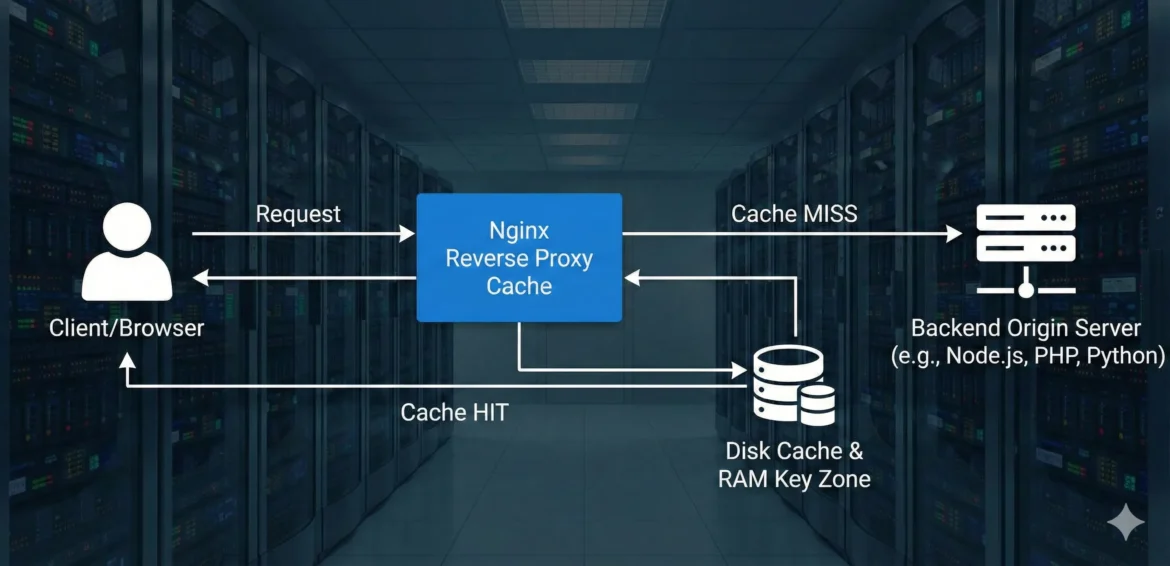
Before we unlock the Nginx caching secrets, it’s vital to understand the mechanism. Nginx, acting as a reverse proxy, sits between the client (user’s browser) and the backend origin server (e.g., a NodeJS, Python, or PHP application).
When a request arrives:
- Nginx first checks its local disk-based cache.
- If the resource is found and is not expired (a cache HIT), Nginx delivers it immediately, bypassing the slow backend.
- If it’s not in the cache or is expired (a cache MISS), Nginx forwards the request to the origin, stores the response in the cache, and then delivers it to the client.
This simple workflow is the basis for incredible speed gains, dramatically reducing latency and the load on your application servers. The key to peak performance lies in meticulously configuring the caching behavior.
HackerVault Tip: A well-configured Nginx cache can absorb 80% or more of your traffic, making your backend servers feel like they are barely working, even under heavy load.
2. Secret 1: Mastering the proxy_cache_path Directive
The proxy_cache_path directive defines the location and essential parameters of your cache storage. This is where every Nginx caching secrets configuration begins.
Defining the Cache Zone
You must declare this directive in the http context of your Nginx configuration.
Nginx
http {
    # 1. Path to the cache directory
    # 2. Key zone name and shared memory size (e.g., 100 megabytes)
    # 3. Directory structure levels
    # 4. Maximum size of the cache on disk
    proxy_cache_path /var/cache/nginx/hacker_cache levels=1:2 keys_zone=HackerVaultCache:100m max_size=10g inactive=60m use_temp_path=off;

    # ... other http settings ...
}

server {
    # ... server block settings ...
    location ~* \.(jpg|jpeg|png|gif|ico|css|js|woff2|webp)$ {
        proxy_cache HackerVaultCache;
        proxy_cache_valid 200 302 7d; # Cache 200 and 302 responses for 7 days
        proxy_cache_revalidate on;
        add_header X-Cache-Status $upstream_cache_status;

        # Link to internal security post
        # # internal_link_1: https://hackervault.tech/nginx-security-hardening-guide/
    }
}
🧠 Key Parameters Explained:
keys_zone=HackerVaultCache:100m: This creates a shared memory zone calledHackerVaultCacheof 100MB. This zone stores metadata (keys, file pointers) for all cached items, allowing Nginx to quickly determine if a resource is cached without hitting the disk. This is essential for performance.max_size=10g: Sets the absolute disk limit for the cache at 10 Gigabytes. Once this limit is reached, a background process (the cache manager) cleans out the least recently used (LRU) files.inactive=60m: A file in the cache that hasn’t been accessed for 60 minutes will be removed by the cache manager, regardless of its cache-validity period. This helps reclaim space for unused assets.use_temp_path=off: Powerful performance boost! This tells Nginx to write the temporary files directly into the same filesystem that holds the cache. This avoids unnecessary data copies and is a must-use setting (especially for SSDs).
3. Secret 2: Implementing Intelligent Cache-Busting with $uri and $arg_...
Standard caching works well, but what about dynamic content or when a user session affects the content? To correctly cache dynamic pages while respecting varying parameters, you must customize the cache key using proxy_cache_key.
By default, Nginx uses the request URI. We need to append variables that impact the content.
Cache Key Customization Example
Imagine you have an internal search page at /search that needs to respect the q (query) parameter, but ignore a tracking parameter like _utm_source.
Nginx
location /search {
    proxy_cache HackerVaultCache;

    # The CRITICAL customization:
    # Use the URI + the value of the 'q' query argument
    proxy_cache_key $scheme$host$uri$is_args$arg_q;

    # Cache only search results (200 status) for 15 minutes
    proxy_cache_valid 200 15m;

    # Internal link for more on dynamic content
    # internal_link_2: https://hackervault.tech/securing-dynamic-content-apis/
}
$arg_q: Ensures that/search?q=nginxand/search?q=apacheare stored as two separate, distinct cache entries.- Ignoring a variable: Since we explicitly defined the key using
$arg_q, other variables like$arg_utm_sourcewill be ignored, unifying the cache entry for optimal hits.
4. Secret 3: The Critical Role of proxy_cache_revalidate and stale Directives
These directives are the most underutilized Nginx caching secrets for improving perceived latency and site resilience.
A. The Power of Revalidation (proxy_cache_revalidate)
This instructs Nginx to use conditional requests (using the If-Modified-Since and If-None-Match headers) when checking the backend for an expired item.
- Without it: Nginx performs a full request (downloading the entire content) if the cache is expired.
- With it (
on): If the content hasn’t changed, the backend simply returns a small304 Not Modifiedresponse. This saves bandwidth and backend processing power.
Nginx
proxy_cache_revalidate on;
B. Graceful Degradation with proxy_cache_use_stale
If your backend server is down, overloaded, or takes too long to respond, your users would normally see an error. The proxy_cache_use_stale directive ensures Nginx serves the expired (stale) version from the cache instead of an error. This is a powerful resilience feature.
Nginx
location / {
    proxy_cache HackerVaultCache;
    proxy_cache_valid 200 60m; # Standard cache time

    # If backend returns a timeout, error, or is down, serve the stale item
    proxy_cache_use_stale error timeout http_500 http_502 http_503 http_504;

    # Internal link on site resilience
    # internal_link_3: https://hackervault.tech/high-availability-principles/
}
5. Secret 4: Fine-Tuning Cache Headers for Maximum Efficiency
While the proxy_cache_path dictates how Nginx stores and manages the cache, the headers control what gets cached and for how long.
Overriding Backend Headers
Sometimes, your application framework (e.g., WordPress, Django) might send sub-optimal headers (like Cache-Control: private for public assets). You can use proxy_hide_header and add_header to correct this.
Nginx
location ~* \.(css|js)$ {
    # 1. Hide the backend's potentially incorrect headers
    proxy_hide_header Cache-Control;
    proxy_hide_header Expires;
    proxy_hide_header Pragma;

    # 2. Add an explicit, powerful Nginx-controlled header
    add_header Cache-Control "public, max-age=31536000, immutable";

    proxy_cache HackerVaultCache;
    proxy_cache_valid 200 302 365d; # Explicitly cache for a year in Nginx
    proxy_cache_revalidate on;
}
The immutable directive in the Cache-Control header is a massive benefit for static assets (like JS, CSS, fonts). It tells the browser that this file will never change and should be served from the browser’s cache until the expiration date. Use this only for versioned assets (e.g., style.v123.css).
6. Secret 5: Boosting Security with Custom Cache Keys
One of the most overlooked Nginx caching secrets is its impact on security. A poorly configured cache can lead to cache-poisoning attacks or accidentally serving content meant for one user to another (a major data leak).
Preventing Cache Poisoning
If your backend relies on a custom header, like X-Client-Location, to render different content, you must include that header in the cache key. Otherwise, Nginx caches the first version it sees and serves it globally.
The Solution: proxy_cache_vary_on_cookie and proxy_cache_key
The Vary header tells the client that the content might change based on a different request header (e.g., Accept-Encoding). For Nginx, the proxy_cache_vary_on_cookie directive is critical for safely caching dynamic content that relies on specific cookies.
Nginx
location /dynamic-feed {
    proxy_cache HackerVaultCache;

    # IMPORTANT: Only cache if the 'session_id' cookie is NOT present
    # This prevents caching private, user-specific data.
    if ($cookie_session_id) {
        set $no_cache 1;
    }

    # If session is active, do not cache
    proxy_no_cache $no_cache;
    proxy_cache_bypass $no_cache;

    # Define which cookies *should* cause a different cache entry
    # This is useful for things like A/B testing cookies
    proxy_cache_vary_on_cookie "ab_test_group";

    # External link to authoritative documentation
    # external_link_1: https://docs.nginx.com/nginx/admin-guide/content-caching/nginx-caching/
}
Full config
production-ready Nginx configuration file incorporating all the caching secrets discussed.
This configuration is designed to be dropped into your nginx.conf or a specific site configuration file (e.g., /etc/nginx/sites-available/hackervault).
# ============================================================
# HTTP CONTEXT (Global Settings)
# ============================================================
# Place this inside your main http { ... } block
# ------------------------------------------------------------

# Secret 1: Defining the Cache Zone
# path: /var/cache/nginx/hackervault
# levels: 1:2 (Creates a deep directory structure to prevent file system limits)
# keys_zone: Named 'HackerVaultCache', 100MB shared memory for keys
# max_size: 10GB limit for cached files
# inactive: Delete files not accessed in 60 minutes
# use_temp_path: off (Writes directly to cache dir for speed)
proxy_cache_path /var/cache/nginx/hackervault levels=1:2 keys_zone=HackerVaultCache:100m max_size=10g inactive=60m use_temp_path=off;

# Map to safe-guard against caching when specific cookies are present (Secret 5)
map $http_cookie $no_cache_cookie {
    default 0;
    "~*session_id" 1; # If session_id cookie exists, set variable to 1
    "~*authorization" 1; # If authorization cookie exists, set variable to 1
}

# ============================================================
# SERVER CONTEXT
# ============================================================
server {
    listen 80;
    listen [::]:80;
    server_name hackervault.tech www.hackervault.tech;

    # Redirect HTTP to HTTPS (Best Practice)
    return 301 https://$host$request_uri;
}

server {
    listen 443 ssl http2;
    listen [::]:443 ssl http2;
    server_name hackervault.tech;

    # SSL Certificates (Adjust paths to your actual certs)
    ssl_certificate /etc/letsencrypt/live/hackervault.tech/fullchain.pem;
    ssl_certificate_key /etc/letsencrypt/live/hackervault.tech/privkey.pem;

    # Optimization: Keepalive connections to the backend
    proxy_http_version 1.1;
    proxy_set_header Connection "";

    # --------------------------------------------------------
    # DEFAULT LOCATION (Dynamic Content)
    # --------------------------------------------------------
    location / {
        # Upstream Backend (e.g., Node.js, PHP-FPM, Python)
        proxy_pass http://127.0.0.1:3000;

        # Standard Proxy Headers
        proxy_set_header Host $host;
        proxy_set_header X-Real-IP $remote_addr;
        proxy_set_header X-Forwarded-For $proxy_add_x_forwarded_for;
        proxy_set_header X-Forwarded-Proto $scheme;

        # --- CACHE CONFIGURATION START ---

        # Enable the cache zone defined in HTTP context
        proxy_cache HackerVaultCache;

        # Secret 3A: Revalidation
        # If cache is expired, ask backend if file changed before downloading
        proxy_cache_revalidate on;

        # Secret 3B: Graceful Degradation (Resilience)
        # Serve stale cache if backend is erroring or timing out
        proxy_cache_use_stale error timeout http_500 http_502 http_503 http_504 updating;

        # Improve concurrency: only one request goes to backend for same key
        proxy_cache_lock on;

        # Secret 2: Custom Cache Key (Intelligent Cache-Busting)
        # Includes Scheme, Host, URI, and Query Args
        proxy_cache_key $scheme$host$uri$is_args$args;

        # Secret 5: Security - Prevent Caching for Logged-in Users
        # Uses the map defined in HTTP block
        proxy_cache_bypass $no_cache_cookie;
        proxy_no_cache $no_cache_cookie;

        # Cache Validity
        proxy_cache_valid 200 302 10m; # Cache successful hits for 10 mins
        proxy_cache_valid 404 1m;      # Cache "Not Found" briefly to stop floods

        # Debugging Header (Show HIT/MISS status to client)
        add_header X-Cache-Status $upstream_cache_status;

        # --- CACHE CONFIGURATION END ---
    }

    # --------------------------------------------------------
    # STATIC ASSETS (Aggressive Caching)
    # --------------------------------------------------------
    location ~* \.(jpg|jpeg|png|gif|ico|css|js|woff2|webp|svg)$ {
        proxy_pass http://127.0.0.1:3000;

        proxy_cache HackerVaultCache;
        proxy_cache_key $scheme$host$uri; # Ignore query strings for static files (usually safe)
        proxy_cache_valid 200 302 365d;   # Cache for 1 year

        # Secret 4: Fine-Tuning Headers
        # Hide backend headers that might disable caching
        proxy_hide_header Cache-Control;
        proxy_hide_header Expires;

        # Force browser to cache aggressively (Immutable)
        add_header Cache-Control "public, max-age=31536000, immutable";

        # Ensure we still see the cache status
        add_header X-Cache-Status $upstream_cache_status;

        # Optimization: Don't log access to static assets to save disk I/O
        access_log off;
    }

    # --------------------------------------------------------
    # CACHE PURGE (Optional - requires ngx_cache_purge module)
    # --------------------------------------------------------
    # location ~ /purge(/.*) {
    #     allow 127.0.0.1;   # Only allow local purge
    #     deny all;
    #     proxy_cache_purge HackerVaultCache $scheme$host$1$is_args$args;
    # }
}
🛠️ How to Apply This:
Create Directory: Ensure the cache directory exists and has correct permissions:
mkdir -p /var/cache/nginx/hackervault
chown -R www-data:www-data /var/cache/nginx/hackervault
Edit Config: Paste the proxy_cache_path line into your main /etc/nginx/nginx.conf inside the http {} block.
Site Config: Paste the server {} block into your site configuration file.
Test & Reload:
nginx -t   # Test for syntax errors
systemctl reload nginx # Apply changes
By explicitly controlling what is not cached (proxy_no_cache and proxy_cache_bypass) based on sensitive cookies like session_id, you prevent the most common caching-related security and privacy failures. For more advanced protection, review the [OWASP Top 10 Security Risks](https://hackervault.tech/owasp-top-10-application-security-guide/).
People Also Ask (PAA)
- What is the difference between Nginx cache and browser cache?
- Nginx cache (Reverse Proxy Cache) is server-side; it reduces the load on the backend application server. Browser cache (Client Cache) is client-side; it stores files on the user’s device, eliminating the need for any network request. Nginx and the backend control the browser cache via HTTP headers like
Cache-ControlandExpires.
- Nginx cache (Reverse Proxy Cache) is server-side; it reduces the load on the backend application server. Browser cache (Client Cache) is client-side; it stores files on the user’s device, eliminating the need for any network request. Nginx and the backend control the browser cache via HTTP headers like
- How do I clear the Nginx cache?
- The simplest way is to manually delete the files in the cache directory defined in
proxy_cache_path(e.g.,/var/cache/nginx/hacker_cache). For a production environment, use thengx_cache_purgemodule to selectively delete specific items based on their key.
- The simplest way is to manually delete the files in the cache directory defined in
- Is Nginx cache fast?
- Yes, Nginx cache is exceptionally fast. By default, it stores the cache index in RAM (shared memory zone) and the content on disk, leading to near-instantaneous lookups and minimal I/O latency, often measured in microseconds.







SP666h … now that’s a name! I saw it around, looks safe for a spin. A bit weird, and not my regular cup of tea, but interesting nonetheless! If weird is your thing, check out sp666h!
Thank you for your sharing. I am worried that I lack creative ideas. It is your article that makes me full of hope. Thank you. But, I have a question, can you help me? https://www.binance.info/id/register?ref=UM6SMJM3
Yo, anyone tried MPLBetBet? Saw it advertised, wondering if it’s worth downloading. Is it legit? Let me know your thoughts! Link here anyway: mplbetbet
I don’t think the title of your article matches the content lol. Just kidding, mainly because I had some doubts after reading the article. https://www.binance.com/pt-BR/register?ref=GJY4VW8W
Just made my first deposit on 345vipbet. Hoping for some good luck! Their VIP program seems pretty enticing, so I’m aiming for that!
Thank you for your sharing. I am worried that I lack creative ideas. It is your article that makes me full of hope. Thank you. But, I have a question, can you help me?
Your point of view caught my eye and was very interesting. Thanks. I have a question for you. https://accounts.binance.com/sk/register-person?ref=WKAGBF7Y
Your point of view caught my eye and was very interesting. Thanks. I have a question for you.
Your article helped me a lot, is there any more related content? Thanks!
Your article helped me a lot, is there any more related content? Thanks!
Thank you for your sharing. I am worried that I lack creative ideas. It is your article that makes me full of hope. Thank you. But, I have a question, can you help me? https://accounts.binance.com/sl/register-person?ref=I3OM7SCZ
LeoVegas casino is a great platform with a generous bonus. You have a lot of options to play and win some real money. I will suggest leovegas casino.
Hey, I always check CasinoGuru for the real deal on online casinos. They give you the honest scoop, no fluff. Definitely my go-to resource. Check it out yourself at casinoguru
Precisa do aplicativo Betano para iOS? Encontre aqui! Instalação rápida e fácil: aplicativo betano ios
Thank you for your sharing. I am worried that I lack creative ideas. It is your article that makes me full of hope. Thank you. But, I have a question, can you help me?
Thank you for your sharing. I am worried that I lack creative ideas. It is your article that makes me full of hope. Thank you. But, I have a question, can you help me?
I don’t think the title of your article matches the content lol. Just kidding, mainly because I had some doubts after reading the article.
Thank you for your sharing. I am worried that I lack creative ideas. It is your article that makes me full of hope. Thank you. But, I have a question, can you help me? https://accounts.binance.com/register-person?ref=QCGZMHR6
Your article helped me a lot, is there any more related content? Thanks! https://www.binance.info/lv/register?ref=SMUBFN5I
rico777bet… catchy name! Gave it a spin. Not bad. Pretty smooth experience overall. Some stuff is great while some is not but definitely fun for a night. Check it rico777bet !
Alright, 73betplataforma. I’ve just checked it out. Nice colour and its user-friendly. Easy to use, no glitches so far. 73betplataforma for me!
900betcasino has a slick interface and a really solid variety of games. I’ve won a few times, so I can vouch for them. Give 900betcasino a try!
I don’t think the title of your article matches the content lol. Just kidding, mainly because I had some doubts after reading the article.
Your article helped me a lot, is there any more related content? Thanks! https://accounts.binance.com/register-person?ref=QCGZMHR6
Thanks for sharing. I read many of your blog posts, cool, your blog is very good. https://accounts.binance.com/ro/register?ref=HX1JLA6Z
Thanks for sharing. I read many of your blog posts, cool, your blog is very good.
I don’t think the title of your article matches the content lol. Just kidding, mainly because I had some doubts after reading the article. https://www.binance.com/de-CH/register?ref=W0BCQMF1
Can you be more specific about the content of your article? After reading it, I still have some doubts. Hope you can help me.
Nulls Brawl iOS permet aux utilisateurs Apple de profiter d’une version modifiée de Brawl Stars avec toutes les ressources débloquées. Facile à utiliser, cette version offre une expérience immersive sans limites et convient parfaitement aux joueurs iOS.
Can you be more specific about the content of your article? After reading it, I still have some doubts. Hope you can help me.
Can you be more specific about the content of your article? After reading it, I still have some doubts. Hope you can help me. https://www.binance.com/register?ref=QCGZMHR6
Can you be more specific about the content of your article? After reading it, I still have some doubts. Hope you can help me.
Your point of view caught my eye and was very interesting. Thanks. I have a question for you.
I don’t think the title of your article matches the content lol. Just kidding, mainly because I had some doubts after reading the article. https://www.binance.info/register?ref=IXBIAFVY